
User’s guide

The NOVAS C astrometry library, made better.
- C99 API documentation
- C++ API documentation
- SuperNOVAS pages on github.io
SuperNOVAS is a C/C++ astronomy software library, providing high-precision astrometry such as one might need for running an observatory, a precise planetarium program, or for analyzing astronomical datasets. It started as a fork of the Naval Observatory Vector Astrometry Software (NOVAS) C version 3.1, but since then it has grown into its own, providing bug fixes, tons of new features, and a much improved API compared to the original NOVAS.
SuperNOVAS is easy to use and it is very fast, with 3–5 orders of magnitude faster position calculations than astropy 7.0.0 in a single thread (see the benchmarks), and its performance will scale further with the number of CPUs when calculations are performed in parallel threads.
SuperNOVAS is and it is available through the Sigmyne/SuperNOVAS repository on GitHub, without licensing restrictions. Its source code is compatible with the C99 and C++11 standards, and hence should be suitable for old and new platforms alike. And, despite it being a light-weight library, it fully supports the IAU 2000/2006 conventions for microarcsecond-level position calculations.
This document has been updated for the v1.6 and later releases.
Table of Contents
- Introduction
- Fixed NOVAS C 3.1 issues
- Compatibility with NOVAS C 3.1
- Building and installation
- Celestial coordinate systems (old vs. new)
- Example use cases
- Incorporating Solar-system ephemeris data or services
- Notes on precision
- Runtime debug support
- Representative benchmarks
- SuperNOVAS added features
- Release schedule
Introduction
SuperNOVAS is a fork of the The Naval Observatory Vector Astrometry Software (NOVAS). (It is not related to the separate NOVA / libnova library.)
The primary goal of SuperNOVAS is to improve on the original NOVAS C library via:
- Fixing outstanding issues.
- Improved C99 API documentation.
- Faster calculations.
- New features.
- Refined C99 API to promote best programming practices.
- New, high-level, C++11 API.
- Thread-safe calculations.
- Debug mode with informative error tracing.
- Regression testing and continuous integration on GitHub.
At the same time, SuperNOVAS aims to be fully backward compatible with the intended functionality of the upstream NOVAS C library, such that it can be used as a build-time replacement for NOVAS in your application without having to change existing (functional) code you may have written for NOVAS C.
SuperNOVAS is really quite easy to use. Its new API is just as simple and intuitive as that of astropy (or so
we strive for it to be), and it is similarly well documented also (see the
documentation for the C99) and/or
C++ APIs. You can typically achieve the
same results with similar lines of code on
C or
C++
with SuperNOVAS as with astropy, notwithstanding a little more involved error handling (due to the lack of
try / except style constructs in C/C++).
SuperNOVAS is currently based on NOVAS C version 3.1. We plan to rebase SuperNOVAS to the latest upstream release of the NOVAS C library, if possible when new releases become available.
SuperNOVAS is maintained by Attila Kovács (Sigmyne, LLC),
Outside contributions are very welcome. See how you can contribute on how you can make SuperNOVAS even better.
Related links
- NOVAS home page at the US Naval Observatory.
- CALCEPH C library for integrating Solar-system ephemerides from JPL and/or in INPOP 2.0/3.0 format.
- NAIF SPICE toolkit for integrating Solar-system ephemerides from JPL.
- Sigmyne/cspice-sharedlib for building CSPICE as a shared library for dynamic linking.
- IAU Minor Planet Center provides up-to-date orbital elements for asteroids, comets, and near-Earth objects (NEOs), including newly discovered objects.
- IERS Earth Rotation and Reference Systems Service provides Earth Orientation Parameter (EOP) data for many high accuracy calculations.
Fixed NOVAS C 3.1 issues
SuperNOVAS fixes a number of outstanding issues with NOVAS C 3.1:
-
Fixes the sidereal_time bug, whereby the
sidereal_time()function had an incorrect unit cast. This was a documented issue of NOVAS C 3.1. -
Fixes the ephem_close bug, whereby
ephem_close()ineph_manager.cdid not reset theEPHFILEpointer to NULL. This was a documented issue of NOVAS C 3.1. -
Fixes antedating velocities and distances for light travel time in
ephemeris(). When getting positions and velocities for Solar-system sources, it is important to use the values from the time light originated from the observed body rather than at the time that light arrives to the observer. This correction was done properly for positions, but not for velocities or distances, resulting in incorrect observed radial velocities or apparent distances being reported for spectroscopic observations or for angular-physical size conversions. -
Fixes bug in
ira_equinox()which may return the result for the wrong type of equinox (mean vs. true) if theequinoxargument was changing from 1 to 0, and back to 1 again with the date being held the same. This affected routines downstream also, such assidereal_time(). -
Fixes accuracy switching bug in
cio_basis(),cio_location(),ecl2equ(),equ2ecl_vec(),ecl2equ_vec(),geo_posvel(),place(), andsidereal_time(). All these functions returned a cached value for the other accuracy if the other input parameters are the same as a prior call, except the accuracy. -
Fixes multiple bugs related to using cached values in
cio_basis()with alternating CIO location reference systems. This affected many CIRS-based position calculations downstream. -
Fixes bug in
equ2ecl_vec()andecl2equ_vec()whereby a query withcoord_sys = 2(GCRS) has overwritten the cached mean obliquity value forcoord_sys = 0(mean equinox of date). As a result, a subsequent call withcoord_sys = 0and the same date as before would return the results in GCRS coordinates instead of the requested mean equinox of date coordinates. -
Some remainder calculations in NOVAS C 3.1 used the result from
fmod()unchecked, which resulted in angles outside of the expected [0:2π] range and was also the reason whycal_date()did not work for negative JD values. -
Fixes
aberration()returning NaN vectors if theveargument is 0. It now returns the unmodified input vector appropriately instead. -
Fixes unpopulated
azoutput value inequ2hor()at zenith. While any azimuth is acceptable really, it results in unpredictable behavior. Hence, we setazto 0.0 for zenith to be consistent. -
Fixes potential string overflows and eliminates associated compiler warnings.
-
Nutation series used truncated expressions for the fundamental arguments, resulting in μas-level errors in when dozens or more years away from the reference epoch of J2000.
-
[v1.1] Fixes division by zero bug in
d_light()if the first position argument is the ephemeris reference position (e.g. the Sun forsolsys3.c). The bug affects for examplegrav_def(), where it effectively results in the gravitational deflection due to the Sun being skipped. -
[v1.1] The NOVAS C 3.1 implementation of
rad_vel()has a number of issues that produce inaccurate results. The errors are typically at or below the tens of m/s level for objects not moving at relativistic speeds. -
[v1.4] The NOVAS C 3.1 implementation of
cel2ter()/ter2cel()was such that if bothxpandypparameters were zero, then no wobble correction was applied, not even for the TIO longitude (s’). The error from this omission is very small, at just a few μas (microarcseconds) within a couple of centuries of J2000.
Compatibility with NOVAS C 3.1
SuperNOVAS strives to maintain API compatibility with the upstream NOVAS C 3.1 library, but not binary (ABI) compatibility.
If you have code that was written for NOVAS C 3.1, it should work with SuperNOVAS as is, without modifications. Simply (re)build your application against SuperNOVAS, and you are good to go.
The lack of binary compatibility just means that you cannot drop-in replace the libraries (e.g. the static
libnovas.a, or the shared libnovas.so), from NOVAS C 3.1 with those from SuperNOVAS. Instead, you will have to
build (compile) your application referencing the SuperNOVAS headers and/or libraries from the start.
This is because some function signatures have changed, e.g. to use an enum argument instead of the nondescript
short int option arguments used in NOVAS C 3.1, or because we added a return value to a function that was declared
void in NOVAS C 3.1. We also changed the object structure to contain a long ID number instead of short to
accommodate JPL NAIF codes, for which 16-bit storage is insufficient.
Building and installation
- Build SuperNOVAS using GNU make
- Build SuperNOVAS using CMake
- Install SuperNOVAS via
vcpkg - Linux packages
- Homebrew package
- Nix package
Build SuperNOVAS using GNU make
The SuperNOVAS distribution contains a GNU Makefile, which is suitable for compiling the library (as well as
local documentation, and tests, etc.) on POSIX systems such as Linux, Mac OS X, BSD, Cygwin or WSL – using
GNU make.
Before compiling the library take a look a config.mk and edit it as necessary for your needs, or else define
the necessary variables in the shell prior to invoking make. For example:
-
ENABLE_CPP: As of v1.6, SuperNOVAS offers a C++11 API and library also, but it is not enabled by default. To build C++ library (libsupernovas++), and install the C++ header (supernovas.h) and documentation you should set this option to 1, either in your environment or else inconfig.mk. -
CALCEPH C library integration is automatic on Linux if
ldconfigcan locate thelibcalcephshared library. You can also control CALCEPH integration manually, e.g. by settingCALCEPH_SUPPORT = 1inconfig.mkor in the shell prior to the build. CALCEPH integration will require an accessible installation of the CALCEPH development files (C headers and unversioned static or shared libraries depending on the needs of the build). -
NAIF CSPICE Toolkit integration is automatic on Linux if
ldconfigcan locate thelibcspiceshared library. You can also control CSPICE integration manually, e.g. by settingCSPICE_SUPPORT = 1inconfig.mkor in the shell prior to the build. CSPICE integration will require an accessible installation of the CSPICE development files (C headers, under acspice/subfolder in the header search path, and unversioned static or shared libraries depending on the needs of the build). You might want to check out the Sigmyne/cspice-sharedlib repository for building CSPICE as a shared library. -
If your compiler does not support the C11 standard and it is not GCC >=3.3, but provides some nonstandard support for declaring thread-local variables, you may want to pass the keyword to use to declare variables as thread local via
-DTHREAD_LOCAL=...added toCFLAGS. (Don’t forget to enclose the string value in escaped quotes inconfig.mk, or unescaped if defining theTHREAD_LOCALshell variable prior to invokingmake.)
Additionally, you may set number of environment variables to futher customize the build, such as:
-
CC: The C compiler to use (default:gcc). -
CPPFLAGS: C preprocessor flags, such as externally defined compiler constants. -
CFLAGS: Flags to pass onto the C compiler (default:-g -Os -Wall). Note,-Iincludewill be added automatically. -
LDFLAGS: Extra linker flags (default is not set). Note,-lmwill be added automatically. -
CSTANDARD: Optionally, specify the C standard to compile for, e.g.c99to compile for the C99 standard. If defined then-std=$(CSTANDARD)is added toCFLAGSautomatically. -
WEXTRA: If set to 1,-Wextrais added toCFLAGSautomatically. -
FORTIFY: If set it will set the_FORTIFY_SOURCEmacro to the specified value (gccsupports values 1 through 3). It affords varying levels of extra compile time / runtime checks. -
CHECKEXTRA: Extra options to pass tocppcheckfor themake checktarget -
DOXYGEN: Specify thedoxygenexecutable to use for generating documentation. If not set (default),makewill usedoxygenin yourPATH(if any). You can also set it tononeto disable document generation and the checking for a usabledoxygenversion entirely.
Now you are ready to build the library:
$ make
will compile the shared (e.g. lib/libsupernovas.so) libraries, and compile the API documentation (into doc/)
using doxygen (if available). Alternatively, you can build select components of the above with the make targets
shared, and local-dox respectively. And, if unsure, you can always call make help to see what build targets are
available.
To build SuperNOVAS as static libraries, use make static.
After building the library you can install the above components to the desired locations on your system. For a system-wide install you may simply run:
$ sudo make install
Or, to install in some other locations, you may set a prefix and/or DESTDIR. For example, to install under /opt
instead, you can:
$ sudo make prefix="/opt" install
Or, to stage the installation (to /usr) under a ‘build root’:
$ make DESTDIR="/tmp/stage" install
TIP
On BSD, you will need to use
gmakeinstead ofmake.
NOTE
if you want to build SuperNOVAS for with your old NOVAS C applications you might want to further customize the build. See section on legacy application in the C99 User’s guide.
Build SuperNOVAS using CMake
As of v1.5, SuperNOVAS can be built using CMake (many thanks to Kiran Shila). CMake allows
for greater portability than the regular GNU Makefile. Note, however, that the CMake configuration does not support
all of the build options of the GNU Makefile, such as automatic CALCEPH and CSPICE integration on Linux, supporting
legacy NOVAS C style builds, and code coverage tracking.
The basic build recipe for CMake is:
  $ cmake -B build
  $ cmake --build build
The SuperNOVAS CMake build supports the following options (in addition to the standard CMake options):
BUILD_SHARED_LIBS=ON|OFF(default: OFF) - Build shared libraries instead of staticBUILD_DOC=ON|OFF(default: OFF) - Compile HTML documentation. Requiresdoxygen.BUILD_EXAMPLES=ON|OFF(default: OFF) - Build the included examplesBUILD_TESTING=ON|OFF(default: ON - Build regression testsBUILD_BENCHMARK=ON|OFF(default: OFF - Build benchmarking programsENABLE_CPP=ON|OFF(default: OFF - Build C++11 library (supernovas++) also.ENABLE_CALCEPH=ON|OFF(default: OFF) - Optional CALCEPH ephemeris plugin support. Requirescalcephpackage.ENABLE_CSPICE=ON|OFF(default: OFF) - Optional CSPICE ephemeris plugin support. Requirescspicelibrary installed.
For example, to configure the build of SuperNOVAS with shared libraries and with CALCEPH integration for ephemeris support:
$ cmake -B build -DCMAKE_BUILD_TYPE=Release -DBUILD_SHARED_LIBS=ON -DENABLE_CALCEPH=ON
and then perform the build:
$ cmake --build build
Or, on Windows (Microsoft Visual C) you will want:
$ cmake --build build --config Release
If a CMAKE_BUILD_TYPE is not set, the build will only use the CFLAGS (if any) that were set in the environment.
This is ideal for those who want to have full control of the compiler flags used in the build. Specifying
Release or Debug will append a particular set of appropriate compiler options which are suited for the given
build type. (If you want to use the MinGW compiler on Windows, you’ll want to set
-DCMAKE_C_COMPILER=gcc -G "MinGW Makefiles" options also.)
After a successful build, you can install the Runtime (libraries), and Development (headers, CMake config, and
pkg-config) components, e.g. under /usr/local, as:
$ cmake --install build --prefix /usr/local
Or, you can use the --component option to install just the selected components. For example to install just
the Runtime component:
$ cmake --install build --component Runtime --prefix /usr/local
Install SuperNOVAS via vcpkg
As of version 1.5, SuperNOVAS is available through the vcpkg registry. The vcpkg port
supports a wide range of platforms, including Linux, Windows, MacOS, and Android – for both arm64 and x64
architectures (and in case of Windows also x86). It is effectively the same as the CMake build (above), only with
more simplicity, convenience, and dependency resolution.
You can install the complete SuperNOVAS library with vcpkg as:
$ vcpkg install supernovas
Or, a set of selected component, such as the core C99 library, the C++11 library, and the solsys-calceph plugin
library as:
$ vcpkg install supernovas[core,cpp,solsys-calceph]
The latter will also install the calceph library dependency, as needed.
Linux packages
SuperNOVAS is packaged for Debian, Fedora / EPEL, and NixOS Linux distributions, and derivatives based on these (Ubuntu, Mint, RHEL, CentOS Stream, Alma Linux, Rocky Linux, Oracle Linux etc.).
On Debian-based platforms you might install all components via:
$ sudo apt-get install libsupernovas1 libsupernovas++1 libsolsys-calceph1 libsupernovas-doc libsupernovas-dev
And or Fedora / EPEL based distributions as:
$ sudo dnf install supernovas supernovas-c++ supernovas-solsys-calceph supernovas-doc supernovas-devel
In both cases the first package is the runtime library, the second is the C++11 runtime library, the third is the
runtime for the solsys-calceph plugin, the fourth is documentation, and the last one is the files needed for
application development.
NOTE
The turnaround time for Debian packages is quite slow, and typically follows the 6-month Debian release cycle, whereas the Fedora / EPEL packages are usually fully up-to-date (i.e. in
stable) within a week of a new SuperNOVAS release. Somewhat newer Debian versions may be found intesting, but even that tends to lag behind thestableFedora / EPEL updates.
Homebrew package
As of version 1.5, there is also a Homebrew package through the maintainer’s own Tap, which
includes the solsys-calceph plugin by default. And, as of the 1.6 release it includes the C++11 API library also.
  $ brew tap attipaci/pub
  $ brew install supernovas
Nix package
As of version 1.5, there is also a Nix package.
This declarative and determinstic package manager can be used on every linux distribution as well as MacOS.
The default package includes the solsys-calceph plugin, but can be overriden by changing withCalceph.
Install to your profile with
$ nix profile add nixpkgs#supernovas
Or include in your Nix build of other software with
nativeBuildInputs = with pkgs; [supernovas];
Celestial coordinate systems (old vs. new)
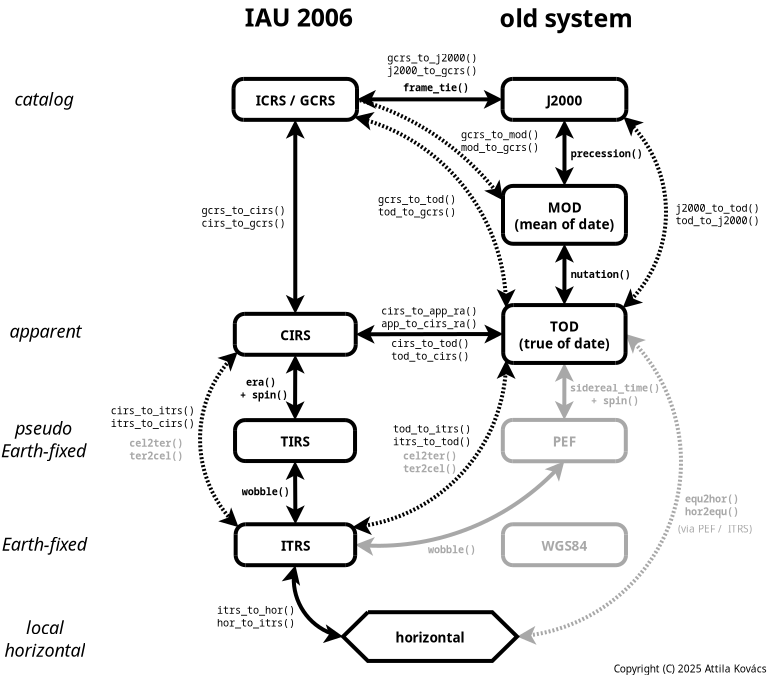 |
|---|
| Figure 1. SuperNOVAS Coordinate Systems and Conversions. Functions indicated in bold face are available in NOVAS C also. All other functions are available in SuperNOVAS only. SuperNOVAS also adds efficient matrix transformations between the equatorial systems. |
The IAU 2000 and 2006 resolutions have completely overhauled the system of astronomical coordinate transformations to enable higher precision astrometry. (Super)NOVAS supports coordinate calculations both in the old (pre IAU 2000) ways, and in the new IAU standard method. The table below provides an overview of how the old and new methods define some of the terms differently:
| Concept | Old standard | New IAU standard |
|---|---|---|
| Catalog coordinate system | MOD (e.g. FK4, FK5, HIP…) | International Celestial Reference System (ICRS) |
| Dynamical system | True of Date (TOD) | Celestial Intermediate Reference System (CIRS) |
| Dynamical R.A. origin | equinox of date | Celestial Intermediate Origin (CIO) |
| Precession, nutation, bias | no tidal terms | IAU 2000/2006 precession/nutation model |
| Celestial Pole offsets | dψ, dε (for TOD) | xp, yp (for ITRS) |
| Earth rotation measure | Greenwich Sidereal Time (GST) | Earth Rotation Angle (ERA) |
| Pseudo Earth-fixed system | PEF | Terrestrial Intermediate Reference System (TIRS) |
| Earth rotation origin | Greenwich Meridian | Terrestrial Intermediate Origin (TIO) |
| Earth-fixed System | WGS84 | International Terrestrial Reference System (ITRS) |
See the various enums and constants defined in novas.h, as well as the descriptions on the various NOVAS routines
on how they are appropriate for the old and new methodologies respectively. Figure 1 also shows the relation of the
various old and new coordinate systems and the (Super)NOVAS functions for converting position / velocity vectors among
them.
NOTE
In NOVAS, the barycentric BCRS and the geocentric GCRS systems are effectively synonymous to ICRS, since the origin for positions and for velocities, in any reference system, is determined by the
observerlocation. Aberration and gravitational deflection correction included for apparent places only (as seen from the observer location, regardless of where that is), but not for geometric places.
TIP
Older catalogs, such as J2000 (FK5), HIP, B1950 (FK4) or B1900 are just special cases of MOD (mean-of-date) coordinates for the J2000, J1991.25, B1950, and B1900 epochs, respectively.
CAUTION
Applying residual polar offsets (Δdψ, Δdε or xp, yp) to the TOD equator (via
cel_pole()) is discouraged. Instead, the sub-arcsecond level corrections to Earth orientation (xp, yp) should be used only for converting between the pseudo Earth-fixed (PEF or TIRS) and ITRS, and vice-versa (e.g. withnovas_make_frame()orwobble()).
NOTE
WGS84 has been superseded by ITRS for higher accuracy definitions of Earth-based locations. WGS84 matches ITRS to the 10m level globally, but it does not account for continental drifts and crustal motion. In (Super)NOVAS all Earth-base locations are presumed ITRS. ITRS longitude, latitude, and altitude coordinates are referenced to the GRS80 ellipsoid, whereas GPS locations are referenced to the WGS84 ellipsoid. SuperNOVAS offers ways to convert between the two if needed.
Example use cases
Recommendation: set up an ephemeris provider
SuperNOVAS can do a lot of things on its own. What it cannot do alone is provide precise positions for Solar-system bodies. For that, you need ephemeris data and a helping hand from an external tool to access them. Even if you don’t particularly care to obtain precise planet positions per se, they are needed for a range of high-precision calculations (such as for positional calculations for Earth-based observers, and gravitational deflections in full-precision observing frames).
Therefore, it is strongly recommended that you download planetary ephemeris files from NASA / JPL (such as the DE440, or the smaller DE440s, or the long-term DE441), and install CALCEPH or the CSPICE Toolkit for accessing these. I recommend CALCEPH, because it is more widely available (also in packaged form), and it is also more modern, and actively maintained.
Provided you installed CALCEPH, you usage of SuperNOVAS should always start with something like this (regardless of whether you will use the C99 or the C++ API afterwards):
 #include <novas-calceph.h>

 // Use DE440, DE440s, or DE441 as your planet provider...
 t_calcephbin *pleph = calceph_open("/path/to/de440.bsp");
 status = novas_use_calceph_planets(pleph);
 if(status < 0) {
   // Oops something went wrong...
 }
Don’t forget to link with -lsolsys-calceph and -lcalceph flags added you yor build. With that, you have now
unlocked a lot of the high-precision capabilities of SuperNOVAS. Have fun with it!
For more details on using CALCEPH or integrating other ways for providing ephemeris data to SuperNOVAS look at the section below.
Pick your flavor (C or C++)
As of v1.6 SuperNOVAS comes in two flavors, the original C99 API, and a higher-level C++11 API. Depending on which one you intend to use, choose the appropriate link to an external document below for further information:
Incorporating Solar-system ephemeris data or services
If you want to use SuperNOVAS to calculate positions for a range of Solar-system objects, and/or to do it with precision, you will have to interface it to a suitable provider of ephemeris data. The preferred ways to do that in SuperNOVAS enumerated below. (The legacy NOVAS C ways are not covered here, since they require specialized builds of SuperNOVAS, which are covered separately.)
NASA/JPL provides generic ephemerides for the major planets, satellites thereof, the 300 largest asteroids, the Lagrange points, and some Earth orbiting stations. For example, DE440 covers the major planets, and the Sun, Moon, and barycenters for times between 1550 AD and 2650 AD. Or, you can use the JPL HORIZONS system (via the command-line / telnet or API interfaces) to generate custom ephemerides (SPK/BSP) for just about all known solar systems bodies, down to the tiniest rocks.
CALCEPH integration
The CALCEPH library provides easy-to-use access to JPL and INPOP ephemeris files from C/C++. As of version 1.2, we provide optional support for interfacing SuperNOVAS with the the CALCEPH C library for handling Solar-system objects.
Prior to building SuperNOVAS simply set CALCEPH_SUPPORT to 1 in config.mk or in your environment (or for CMake
configure with the -DENABLE_CALCEPH=ON). Depending on the build target (or type), it will build
libsolsys-calceph.so[.1] (target shared or CMake option -DBUILD_SHARED_LIBS=ON1) or libsolsys-calceph.a (target
static or default CMake build) libraries or solsys-calceph.o (target solsys, no CMake equivalent), which provide
the novas_use_calceph() and novas_use_calceph_planets(), and novas_calceph_use_ids() functions.
Of course, you will need access to the CALCEPH C development files (C headers and unversioned libcalceph.so or .a
library) for the build to succeed. Here is an example on how you’d use CALCEPH with SuperNOVAS in your application
code:
First and foremost, you should use CALCEPH to provide planet positions via the DE440 or DE440s (smaller file size) or DE441 (long term) ephemeris data:
 #include <novas-calceph.h>

 // Use DE440, DE440s, or DE441 as your planet provider...
 t_calcephbin *pleph = calceph_open("/path/to/de440.bsp");
 status = novas_use_calceph_planets(pleph);
 if(status < 0) {
   // Oops something went wrong...
 }
Even if you don’t care for the planets, you’ll still need the planetary ephemeris for a lot of the high-precision calculations, so don’t skip on this step if you can help it.
Beyond just the planets, you might want to download and use further ephemeris data, such as for the many moons orbiting planets, the major asteroids, various minor bodies of interest (e.g. comets, NEOs), or man-made spacecrafts. You can activate an additional set (or sets) of ephemeris files separately from the planetary ephemeris above. For example:
 // Open all files that you will use concurrently
 t_calcephbin *eph = calceph_open_array(...);

 // Tell SperNOVAS to use CALCEPH with these files for obtaining
 // positions for objects contained within them
 int status = novas_use_calceph(eph);
 if(status < 0) {
   // Oops something went wrong...
 }
All modern JPL (SPK) ephemeris files should work with the solsys-calceph plugin. When linking your application,
add -lsolsys-calceph to your link flags (or else link with solsys-calceph.o), and link against the CALCEPH library
also (-lcalceph). That’s all there is to it.
When using CALCEPH, ephemeris objects are referenced by their ID numbers (object.number), unless it is set to -1, in
which case name-based lookup will be used instead. ID numbers are assumed to be NAIF by default, but
novas_calceph_use_ids() can select between NAIF or CALCEPH numbering systems, if necessary.
NAIF CSPICE toolkit integration
The NAIF CSPICE Toolkit is the canonical standard library for JPL ephemeris files from C/C++. As of version 1.2, we provide optional support for interfacing SuperNOVAS with CSPICE for handling Solar-system objects.
Prior to building SuperNOVAS simply set CSPICE_SUPPORT to 1 in config.mk or in your environment (or for CMake
configure with -DENABLE_CSPICE=ON). Depending on the build target, it will build libsolsys-cspice.so[.1] (target
shared or CMake option -DBUILD_SHARED_LIBS=ON) or libsolsys-cspice.a (target static or default CMake build)
libraries or solsys-cspice.o (target solsys, no CMake equivalent), which provide the novas_use_cspice(),
novas_use_cspice_planets(), and novas_use_cspice_ephem() functions to enable CSPICE for providing data for all
Solar-system sources, or for major planets only, or for other bodies only, respectively. You can also manage the
active kernels with the cspice_add_kernel() and cspice_remove_kernel() functions.
Of course, you will need access to the CSPICE development files (C headers, installed under a cspice/ directory
of a header search location, and the unversioned libcspice.so or .a library) for the build to succeed. You may
want to check out the Sigmyne/cspice-sharedlib GitHub
repository to help you build CSPICE with shared libraries and dynamically linked tools.
Here is an example on how you might use CSPICE with SuperNOVAS in your application code:
 #include <novas-cspice.h>

 // You can load the desired kernels for CSPICE
 // E.g. load DE440s and the Mars satellites:
 int status;

 status = cspice_add_kernel("/path/to/de440s.bsp");
 if(status < 0) {
   // oops, the kernels must not have loaded...
   ...
 }

 // Load additional kernels as needed...
 status = cspice_add_kernel("/path/to/mar097.bsp");
 ...

 // Then use CSPICE as your SuperNOVAS ephemeris provider
 novas_use_cspice();
All JPL ephemeris data will work with the solsys-cspice plugin. When linking your application, add -lsolsys-cspice
to your link flags (or else link with solsys-cspice.o), and of course the CSPICE library also. That’s all there is
to it.
When using CSPICE, ephemeris objects are referenced by their NAIF ID numbers (object.number), unless that number is
set to -1, in which case name-based lookup will be used instead.
Universal ephemeris data / service integration
Possibly the most universal way to integrate ephemeris data with SuperNOVAS is to write your own
novas_ephem_provider function.
 int my_ephem_reader(const char *name, long id, double jd_tdb_high, double jd_tdb_low,
                     enum novas_origin *restrict origin,
                     double *restric pos, double *restrict vel) {
   // Your custom ephemeris reader implementation here
   ...
 }
which takes an object ID number (such as a NAIF), an object name, and a split TDB date (for precision) as it inputs,
and returns the type of origin with corresponding ICRS position and velocity vectors in the supplied pointer
locations. The function can use either the ID number or the name to identify the object or file (whatever is the most
appropriate for the implementation and for the supplied parameters). The positions and velocities may be returned
either relative to the SSB or relative to the heliocenter, and accordingly, your function should set the value
pointed at by origin to NOVAS_BARYCENTER or NOVAS_HELIOCENTER accordingly. Positions and velocities are
rectangular ICRS x,y,z vectors in units of AU and AU/day respectively.
This way you can easily integrate current ephemeris data, e.g. for the Minor Planet Center (MPC), or whatever other ephemeris service you prefer.
Once you have your adapter function, you can set it as your ephemeris service via set_ephem_provider():
set_ephem_provider(my_ephem_reader);
By default, your custom my_ephem_reader function will be used for NOVAS_EPHEM_OBJECT type objects only (i.e.
anything other than the major planets, the Sun, Moon, Solar-system Barycenter…). But, you can use the same function
for the major planets (NOVAS_PLANET type objects) also via:
 set_planet_provider(planet_ephem_provider);
 set_planet_provider_hp(planet_ephem_provider_hp);
The above simply instructs SuperNOVAS to use the same ephemeris provider function for planets as what was set
for NOVAS_EPHEM_OBJECT type objects, provided you compiled SuperNOVAS with BUILTIN_SOLSYS_EPHEM = 1 (in
config.mk), or else you link your code against solsys-ephem.c explicitly. Easy-peasy.
Notes on precision
Many of the (Super)NOVAS functions take an accuracy argument, which determines to what level of precision quantities are calculated. The argument can have one of two values, which correspond to typical precisions around:
enum novas_accuracy value |
Typical precision |
|---|---|
NOVAS_REDUCED_ACCURACY |
~ 1 milli-arcsecond (mas) |
NOVAS_FULL_ACCURACY |
~ 1 micro-arcsecond (μas) |
Note, that some functions will not support full accuracy calculations, unless you have provided a high-precision
ephemeris provider for the major planets (and any Solar-system bodies of interest), which does not come with
SuperNOVAS out of the box. In the absence of a suitable high-precision ephemeris provider, some functions might
return an error if called with NOVAS_FULL_ACCURACY. (Click on the wedges next to each component to expand the
details…)
Prerequisites to precise results
The SuperNOVAS library is in principle capable of calculating positions to microarcsecond, and velocities to mm/s, precision for all types of celestial sources. However, there are certain prerequisites and practical considerations before that level of accuracy is reached. (Click on the wedge next to each heading below to expand the details.)
High precision calculations will generally require that you use SuperNOVAS with the new IAU standard quantities
and methods. The old ways were simply not suited for precision much below the milliarcsecond level. In particular,
Earth orientation parameters (EOP) should be applied only for converting between TIRS and ITRS systems, and defined
either with novas_make_frame() or else with wobble(). The old ways of incorporating (global) offsets in TOD
coordinates via cel_pole() should be avoided.
Calculations much below the milliarcsecond level will require accounting for gravitational bending around massive
Solar-system bodies, and hence will require you to provide a high-precision ephemeris provider for the major planets.
Without it, there is no guarantee of achieving precision below the milli-arcsecond level in general, especially when
observing near the Sun or massive planets (e.g. observing Jupiter’s or Saturn’s moons, near conjunction with their
host planet). Therefore, some functions will return with an error, if used with NOVAS_FULL_ACCURACY in the absence
of a suitable high-precision planetary ephemeris provider.
Precise calculations for Solar-system sources requires precise ephemeris data for both the target object as well as
for Earth, and the Sun. For the highest precision calculations you also need positions for all major planets to
calculate gravitational deflection precisely. By default, SuperNOVAS can only provide approximate positions for
the Earth and Sun (see earth_sun_calc()) at the tens of arcsecond level. You will need to provide a way to interface
SuperNOVAS with a suitable ephemeris source (such as CALCEPH, or the CSPICE toolkit from JPL) to obtain precise
positions for Solar-system bodies. See the section further above for more information how you can do
that.
Calculating precise positions for any Earth-based observations requires precise knowledge of Earth orientation
parameters (EOP) at the time of observation. Earth’s pole is subject to predictable precession and nutation, but also
small irregular and diurnal variations in the orientation of the rotational axis and the rotation period (a.k.a. polar
wobble). You can apply the EOP values in novas_set_time() (for UT1-UTC), and novas_make_frame() (xp
and yp) to improve the astrometric precision of Earth based coordinate calculations. Without the EOP
values, positions for Earth-based calculations will be accurate at the tenths of arcsecond level only.
The IERS Bulletins provide up-to-date
measurements, historical data, and near-term projections for the polar offsets, the UT1-UTC time difference, and
leap-seconds (UTC-TAI). For sub-milliarcsecond accuracy the values published by IERS should be interpolated before
passing to the likes of novas_set_time() or novas_make_frame(). At the micro-arcsecond (μas) level, you will
need to ensure also that the EOP values are provided for the same ITRF realization as the observer’s location, e.g.
via novas_itrf_transform_eop().
Ground based observations are subject to atmospheric refraction. SuperNOVAS offers the option to include
refraction corrections with a set of atmospheric models, or using models you provide. Estimating refraction accurately
requires local weather parameters (pressure, temperature, and humidity), which may be be specified within the
on_surface data structure alongside the observer location. A standard radio refraction model is included as of
version 1.1, as well as our implementation of the wavelength-dependent IAU refraction model
(novas_wave_refraction() since version 1.4) based on the SOFA iauRefco() function. If none of the built-in options
satisfies your needs, you may also implement your own refraction correction to use.
Reduced accuracy shortcuts
When one does not need positions at the microarcsecond level, some shortcuts can be made to the recipe above:
- You may forgo reconciling the ITRF realizations of EOP vs. an Earth-based observing site, if precision at the microarcsecond level is not required.
- You may skip the interpolation of published EOP values, if accuracy below the milliarcsecond level is not required.
- You can use
NOVAS_REDUCED_ACCURACYinstead ofNOVAS_FULL_ACCURACYfor the calculations. This typically has an effect at or below the milliarcsecond level only, but may be much faster to calculate. - You might skip the pole offsets xp, yp. These are tenths of arcsec, typically.
- You may not need to interface to an ephemeris provider if you don’t need positions for Solar-system objects, and you are willing to ignore gravitational redhifts / deflections around Solar-system bodies.
Runtime debug support
You can enable or disable debugging output to stderr with novas_debug(enum novas_debug_mode), where the argument
is one of the defined constants from novas.h:
novas_debug_mode value |
Description |
|---|---|
NOVAS_DEBUG_OFF |
No debugging output (default) |
NOVAS_DEBUG_ON |
Prints error messages and traces to stderr |
NOVAS_DEBUG_EXTRA |
Same as above but with stricter error checking |
The main difference between NOVAS_DEBUG_ON and NOVAS_DEBUG_EXTRA is that the latter will treat minor issues as
errors also, while the former may ignore them. For example, place() will return normally by default if it cannot
calculate gravitational bending around massive planets in full accuracy mode. It is unlikely that this omission would
significantly alter the result in most cases, except for some very specific ones when observing in a direction close
to a major planet. Thus, with NOVAS_DEBUG_ON, place() go about as usual even if the Jupiter’s position is not
known. However, NOVAS_DEBUG_EXTRA will not give it a free pass, and will make place() return an error (and print
the trace) if it cannot properly account for gravitational bending around the major planets as it is expected to.
When debug mode is enabled, any error condition (such as NULL pointer arguments, or invalid input values etc.) will
be reported to the standard error, complete with call tracing within the SuperNOVAS library, s.t. users can have a
better idea of what exactly did not go to plan (and where). The debug messages can be disabled by passing
NOVAS_DEBUG_OFF (0) as the argument to the same call. Here is an example error trace when your application calls
grav_def() with NOVAS_FULL_ACCURACY while solsys3 provides Earth and Sun positions only and when debug mode is
NOVAS_DEBUG_EXTRA (otherwise we’ll ignore that we skipped the almost always negligible deflection due to planets):
  ERROR! earth_sun_calc: invalid or unsupported planet number: 6 [=> 2]
       @ earth_sun_calc_hp [=> 2]
       @ ephemeris:planet [=> 12]
       @ light_time2 [=> 22]
       @ obs_planets [=> 12]
       @ grav_def [=> 12]
You can use the built-in error tracing to identify where things go awry in your code. You can turn on error tracing for your entire code, or for a relevant section, in which a SuperNOVAS function returns an error (such as -1 or NaN), e.g.:
  novas_debug(NOVAS_DEBUG_ON);

  // The part of your code that might have to do with the error return...
  ...

  novas_debug(NOVAS_DEBUG_OFF);
Representative benchmarks
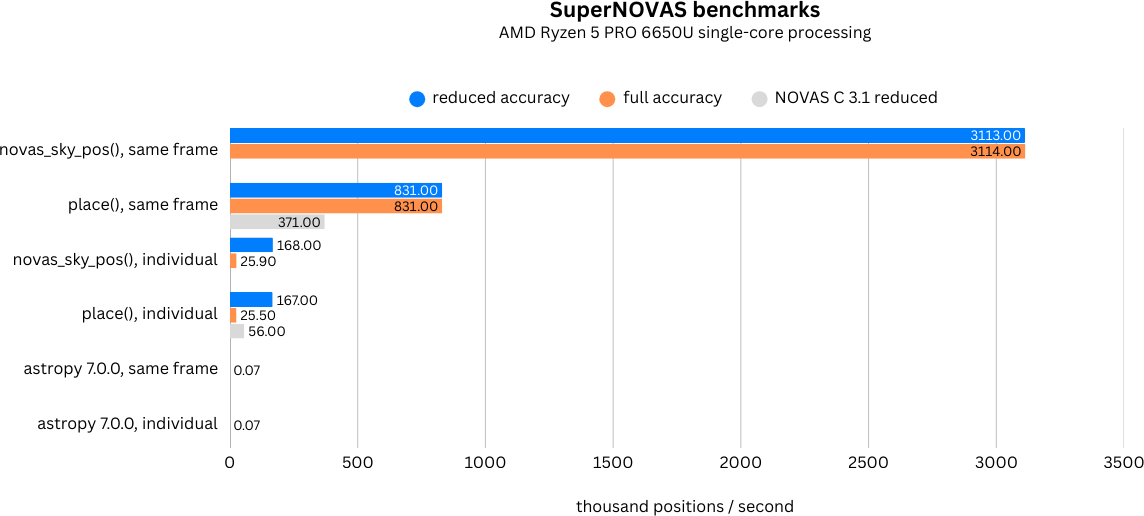
To get an idea of the speed of SuperNOVAS, you can use make benchmark on your machine. Figure 2 below
summarizes the single-threaded results obtained with v1.5.0 on an AMD Ryzen 5 PRO 6650U laptop. While this is clearly
not the state of the art for today’s server class machines, it nevertheless gives you a ballpark idea for how a
typical, not so new, run-of-the-mill PC might perform.
 |
|---|
| Figure 2. SuperNOVAS apparent position calculation benchmarks, including proper motion, the IAU 2000 precession-nutation model, polar wobble, aberration, and gravitational deflection corrections, and precise spectroscopic redhift calculations. |
The tests calculate apparent positions (in CIRS) for a set of sidereal sources with random parameters, using either
the SuperNOVAS novas_sky_pos() or the legacy NOVAS C place(), both in full accuracy and reduced accuracy
modes. The two methods are equivalent, and both include calculating a precise geometric position, as well as
aberration and gravitational deflection corrections from the observer’s point of view.
| Description | accuracy | positions / sec |
|---|---|---|
novas_sky_pos(), same frame |
reduced | 3130414 |
| full | 3149028 | |
place(), same time, same observer |
reduced | 831101 |
| full | 831015 | |
novas_sky_pos(), individual |
reduced | 168212 |
| full | 25943 | |
place(), individual |
reduced | 167475 |
| full | 25537 |
For reference, we also provide the reduced accuracy benchmarks from NOVAS C 3.1.
| Description | accuracy | positions / sec |
|---|---|---|
NOVAS C 3.1 place(), same frame |
reduced | 371164 |
NOVAS C 3.1 place(), individual |
reduced | 55484 |
For comparison, a very similar benchmark with astropy (v7.0.0 on Python v3.13.1) on the
same machine, provides ~70 positions / second both for a fixed frame and for individual frames. As such,
SuperNOVAS is a whopping ~40000 times faster than astropy for calculations in the same observing frame, and
400–2000 times faster than astropy for individual frames. (The astropy benchmarking code is also provided
under the benchmark/ folder in the SuperNOVAS GitHub repository).
| Description | positions / sec |
|---|---|
| astropy 7.0.0 (python 3.13.1), same frame | 71 |
| astropy 7.0.0 (python 3.13.1), individual | 70 |
As one may observe, the SuperNOVAS novas_sky_pos() significantly outperforms the legacy place() function, when
repeatedly calculating positions for sources for the same instant of time and same observer location, providing 3–4
times faster performance than place() with the same observer and time. The same performance is maintained even when
cycling through different frames, a usage scenario in which the performance advantage over place() may be up to 2
orders of magnitude. When observing frames are reused, the performance is essentially independent of the accuracy. By
contrast, calculations for individual observing times or observer locations are generally around twice a fast if
reduced accuracy is sufficient.
The above benchmarks are all for single-threaded performance. Since SuperNOVAS is generally thread-safe, you can expect that performance shall scale with the number of concurrent CPUs used. So, on a 16-core PC, with similar single core performance, you could calculate up to 32 million precise positions per second, if you wanted to. To put that into perspective, you could calculate precise apparent positions for the entire Gaia dataset (1.7 billion stars) in under one minute.
SuperNOVAS added features
New functionality highlights
Below is a non-exhaustive overview new features added by SuperNOVAS on top of the existing NOVAS C API. See
CHANGELOG.md for more details.
-
New runtime configuration:
-
The planet position, and generic Solar-system position calculator functions can be set at runtime, and users can provide their own custom implementations, e.g. to read ephemeris data, such as from a JPL
.bspfile. -
If CIO locations vs GCRS are important to the user, the user may call
set_cio_locator_file()at runtime to specify the location of the binary CIO interpolation table (e.g.CIO_RA.TXTorcio_ra.bin) to use, even if the library was compiled with the different default CIO locator path. -
The default low-precision nutation calculator
nu2000k()can be replaced by another suitable IAU 2006 nutation approximation. For example, the user may want to use theiau2000b()model or some custom algorithm instead.
-
-
New constants, and enums – adding more specificity and transparency to option switches and physical units.
-
Many new functions to provide more coordinate transformations, inverse calculations, and more intuitive usage.
-
New observing-frame based approach for calculations (
frames.c). Anovas_frameobject uniquely defines both the place and time of observation, with a set of precalculated transformations and constants. Once the frame is defined it can be used very efficiently to calculate positions for multiple celestial objects with minimum additional computational cost. The frames API is also more elegant and more versatile than the low-level NOVAS C approach for performing the same kind of calculations. And, frames are inherently thread-safe since post-creation their internal state is never modified during the calculations. -
New
novas_timespecstructure for the self-contained definition of precise astronomical time (timescale.c). You can set the time to a JD date in the timescale of choice (UTC, UT1, GPS, TAI, TT, TCG, TDB, or TCB), or to a UNIX time. Once set, you can obtain an expression of that time in any timescale of choice. And, you can create a new time specification by incrementing an existing one, or measure precise time differences. -
New coordinate reference systems
NOVAS_MOD(Mean of Date) which includes precession but not nutation andNOVAS_J2000for the J2000 dynamical reference system. -
New observer locations
NOVAS_AIRBORNE_OBSERVERandNOVAS_SOLAR_SYSTEM_OBSERVER, and correspondingmake_airborne_observer()andmake_solar_system_observer()functions. Airborne observers have an Earth-fixed momentary location, defined by longitude, latitude, and altitude, the same way as for a stationary observer on Earth, but are moving relative to the surface, such as in an aircraft or balloon based observatory. Solar-system observers are similar to observers in Earth-orbit but their momentary position and velocity is defined relative to the Solar System Barycenter (SSB), instead of the geocenter. -
New set of built-in refraction models to use with the frame-based functions, including a radio refraction model based on the formulae by Berman & Rockwell 1976. Users may supply their own custom refraction model also, and may make use of the generic reversal function
novas_inv_refract()to calculate refraction in the reverse direction (observed vs astrometric elevations as the input) as needed.
-
New functions to calculate and apply additional gravitational redshift corrections for light that originates near massive gravitating bodies (other than major planets, or Sun or Moon), or for observers located near massive gravitating bodies (other than the Sun and Earth).
-
CALCEPH integration to specify and use ephemeris data via the CALCEPH library for Solar-system sources in general, and for major planets specifically.
-
NAIF CSPICE integration to use the NAIF CSPICE library for all Solar-system sources, or for major planets or other bodies only.
-
Added support for using orbital elements.
object.typecan now be set toNOVAS_ORBITAL_OBJECT, whose orbit can be defined bynovas_orbital, relative to anovas_orbital_system. While orbital elements do not always yield precise positions, they can for shorter periods, provided that the orbital elements are up-to-date. For example, the Minor Planet Center (MPC) publishes accurate orbital elements for all known asteroids and comets regularly. For newly discovered objects, this may be the only and/or most accurate information available anywhere. -
Added
NOVAS_EMB(Earth-Moon Barycenter) andNOVAS_PLUTO_BARYCENTERtoenum novas_planetsto distinguish from the corresponding planet centers in calculations. -
Added more physical unit constants to
novas.h.
-
New functions to aid the conversion of LSR velocities to SSB-based velocities, and vice-versa. (Super)NOVAS always defines catalog sources with SSB-based radial velocities, but some catalogs provide LSR velocities.
-
New functions to convert dates/times and angles to/from their string representations.
-
New functions to convert between Julian Days and calendar dates in the calendar of choice (astronomical, Gregorian, or Roman/Julian).
-
New convenience functions for oft-used astronomical calculations, such as rise/set times, LST, parallactic angle (a.k.a. Vertical Position Angle), heliocentric distance, illumination fraction, or incident solar power, Sun and Moon angles, and much more.
-
New functions and data structures provide second order Taylor series expansion of the apparent horizontal or equatorial positions, distances, and redshifts for sources. These values, including rates and accelerations, can be directly useful for controlling telescope drives in horizontal or equatorial mounts to track sources. You can also use them to obtain instantaneous projected (extrapolated) positions at low computational cost.
-
Updated nutation model from IAU2000 to IAU2006 (P03) model, by applying scaling factors (Capitaine et al. 2005) to match the IAU2006 precession model that was already implemented in NOVAS.
-
Approximate Keplerian orbital models for the major planets (Standish & Williams, 1992), EMB, and the Moon (Chapront et al. 2002), for when arcmin-scale accuracy is sufficient (e.g. rise or set times, approximate sky positions).
-
Moon phase calculator functions, based on above orbital modeling.
-
Improved support for expressing and using coordinates in TIRS (Terrestrial Intermediate Reference System) and ITRS (International Terrestrial Reference System).
-
Improvements to atmospheric refraction modeling.
-
Simpler functions to calculate Greenwich Mean and Apparent Sidereal Time (GMST / GAST).
-
Functions to calculate corrections to the Earth orientation parameters published by IERS, to include the effect of libration and ocean tides. Such corrections are necessary to include if needing or using ITRS / TIRS coordinates with accuracy below the milliarcsecond (mas) level.
-
New functions to simplify the handling ground-based observing locations (GPS vs ITRF vs Cartesian locations), including setting default weather values, at least until actual values are specified if needed, and conversion between geodetic (longitude, latitude, altitude) and geocentric Cartesian (x, y, z) site coordinates using the reference ellipsoid of choice (e.g. GRS80 or WGS84).
-
Transformations of site coordinates and Earth orientation parameters between different ITRF realizations (e.g. ITRF2000 and ITRF2014).
-
Functions to calculate the rate at which an observer’s clock ticks differently from a standard astronomical timescale, due to the gravitational potential around the observer and the observer’s movement.
-
No longer using a CIO vs GCRS locator data file in any way, thus eliminating an annoying external soft dependency. This change has absolutely zero effect on backward compatibility and functionality.
-
GNU
makebuild support for Mac OS X and FreeBSD (co-authored with Kiran Shila). -
CMake build support (co-authored with Kiran Shila).
-
Introducing a new, high-level, C++11 API (
supernovas++) on top of the standard C99 one. -
Added a truncated version of the ELP2000 / MPP02 semi-analytical model of the Moon (Chapront & Francou 2003), allowing arcsec (km) level position calculations for the Moon even without ephemeris data.
Refinements to the NOVAS C API
Many SuperNOVAS changes are focused on improving the usability and promote best coding practices so that both the library and your application will be safer, and less prone to nagging errors. Below is a detailed listing of the principal ways SuperNOVAS has improved on the original NOVAS C library in these respects.
-
Changed to support for calculations in parallel threads by making cached results thread-local. This works using the C11 standard
_Thread_local, or the C23thread_local, or else the earlier GNU C >= 3.3 standard__threadmodifier. You can also set the preferred thread-local keyword for your compiler by passing it via-DTHREAD_LOCAL=...inconfig.mkto ensure that your build is thread-safe. And, if your compiler has no support whatsoever for thread_local variables, then SuperNOVAS will not be thread-safe, just as NOVAS C isn’t. -
SuperNOVAS functions take
enums as their option arguments instead of raw integers. The enums allow for some compiler checking (e.g. using the wrong enum), and make for more readable code that is easier to debug. They also make it easy to see what choices are available for each function argument, without having to consult the documentation each and every time. -
All SuperNOVAS functions check for the basic validity of the supplied arguments (Such as NULL pointers, or empty strings) and will return -1 (with
errnoset, usually toEINVAL) if the arguments supplied are invalid (unless the NOVAS C API already defined a different return value for specific cases. If so, the NOVAS C error code is returned for compatibility). -
All erroneous returns now set
errnoso that users can track the source of the error in the standard C way and use functions such asperror()andstrerror()to print human-readable error messages. -
SuperNOVAS prototypes declare function pointer arguments as
constwhenever the function does not modify the data content being pointed at. This supports better programming practices that generally aim to avoid unintended data modifications. -
Many SuperNOVAS functions allow
NULLarguments, both for optional input values as well as outputs that are not required (see the C99 API Documentation for specifics). This eliminates the need to declare dummy variables in your application code. -
Many output values supplied via pointers are set to clearly invalid values in case of erroneous returns, such as
NANso that even if the caller forgets to check the error code, it becomes obvious that the values returned should not be used as if they were valid. (No more sneaky silent failures.) -
All SuperNOVAS functions that take an input vector to produce an output vector allow the output vector argument be the same as the input vector argument. For example,
frame_tie(pos, J2000_TO_ICRS, pos)using the sameposvector both as the input and the output. In this case theposvector is modified in place by the call. This can greatly simplify usage, and eliminate extraneous declarations, when intermediates are not required. -
Catalog names can be up to 6 bytes (including termination), up from 4 in NOVAS C, while keeping
structlayouts the same as NOVAS C thanks to alignment, thus allowing cross-compatible binary exchange ofcat_entryrecords with NOVAS C 3.1. -
Changed
make_object()to retain the specified number argument (which can be different from thestarnumbervalue in the suppliedcat_entrystructure). -
cio_location()will always return a valid value as long as neither output pointer argument is NULL. (NOVAS C 3.1 would return an error if a CIO locator file was previously opened but cannot provide the data for whatever reason). -
cel2ter()andter2cel()can now process ‘option’/’class’ = 1 (NOVAS_REFERENCE_CLASS) regardless of the methodology (EROT_ERAorEROT_GST) used to input or output coordinates in GCRS. -
More efficient paging (cache management) for
cio_array(), including I/O error checking. -
IAU 2000A nutation model uses higher-order Delaunay arguments provided by
fund_args(), instead of the linear model in NOVAS C 3.1. -
IAU 2000 nutation made a bit faster, reducing the the number of floating-point multiplications necessary by skipping terms that do not contribute. Its coefficients are also packed more frugally in memory, resulting in a smaller footprint.
-
Changed the standard atmospheric model for (optical) refraction calculation to include a simple model for the annual average temperature at the site (based on latitude and elevation). This results is a slightly more educated guess of the actual refraction than the global fixed temperature of 10 °C assumed by NOVAS C 3.1 regardless of observing location.
-
[v1.1] Improved the precision of some calculations, like
era(),fund_args(), andplanet_lon()by being more careful about the order in which terms are accumulated and combined, resulting in a small improvement on the few uas (micro-arcsecond) level. -
[v1.1]
place()now returns an error 3 if and only if the observer is at (or very close, within ~1.5m) of the observed Solar-system object. -
[v1.1]
grav_def()is simplified. It no longer uses the location type argument. Instead it will skip deflections due to a body if the observer is within ~1500 km of its center (which is below the surface for all major Solar system bodies). -
[v1.1.1] For major planets (and Sun and Moon)
rad_vel()andplace()will include gravitational corrections to radial velocity for light originating at the surface, and observed near Earth or at a large distance away from the source. -
[v1.3] In reduced accuracy mode apply gravitational deflection for the Sun only. In prior versions, deflection corrections were applied for Earth too. However, these are below the mas-level accuracy promised in reduced accuracy mode, and without it, the calculations for
place()andnovas_sky_pos()are significantly faster. -
[v1.3]
julian_date()andcal_date()now use astronomical calendar dates instead of the fixed Gregorian dates of before. Astronomical dates are Julian/Roman calendar dates prior to the Gregorian calendar reform of 1582. -
[v1.3] Use C99
restrictkeyword to prevent pointer argument aliasing as appropriate. -
[v1.4.2] Nutation models have been upgraded from the original IAU2000 model to IAU2006 (i.e. IAU2000A R06), making them dynamically consistent with the implemented IAU2006 (P03) precession model.
-
[v1.5] Faster IAU2000A (R06) nutation series and
ee_ct()calculations, with a ~2x speedup. -
[v1.5] Weaned off using CIO locator file internally (but still allowing users to access them if they want to).
Release schedule
A predictable release schedule and process can help manage expectations and reduce stress on adopters and developers alike.
SuperNOVAS will try to follow a quarterly release schedule. You may expect upcoming releases to be published around February 1, May 1, August 1, and/or November 1 each year, on an as-needed basis. That means that if there are outstanding bugs, or new pull requests (PRs), you may expect a release that addresses these in the upcoming quarter. The dates are placeholders only, with no guarantee that a new release will actually be available every quarter. If nothing of note comes up, a potential release date may pass without a release being published.
New features are generally reserved for the feature releases (e.g. 1.x.0 version bumps), although they may also be rolled out in bug-fix releases as long as they do not affect the existing API – in line with the desire to keep bug-fix releases fully backwards compatible with their parent versions.
In the weeks and month(s) preceding releases one or more release candidates (e.g. 1.0.1-rc3) will be published
temporarily on GitHub, under Releases, so that changes can be
tested by adopters before the releases are finalized. Please use due diligence to test such release candidates with
your code when they become available to avoid unexpected surprises when the finalized release is published. Release
candidates are typically available for one week only before they are superseded either by another, or by the finalized
release.
Copyright (C) 2026 Attila Kovács